
SMS Opt-In Proof
Porter SMS access is available only to authenticated Porter customers who enter a mobile number in their profile and complete SMS verification before Porter stores the number for normal text access.
Authenticated opt-in screen
The SMS opt-in control lives inside the Porter app at Settings > General > Your Profile. A signed-in customer enters a mobile number in E.164 format and clicks Send Code. Porter sends a verification text to that number before using it for SMS access.
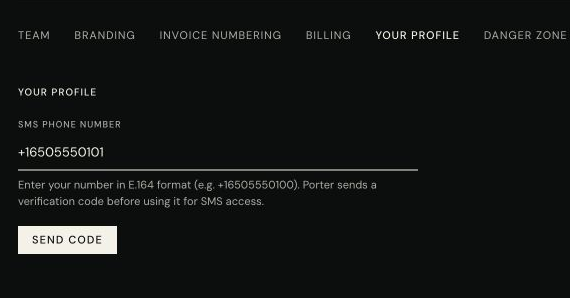
Verification flow
Step 1
The customer signs in at app.buildwithporter.com and opens Settings > General > Your Profile.
Step 2
The customer enters their mobile number and clicks Send Code. Porter sends a one-time SMS verification code to that number.
Step 3
The customer enters the verification code in Porter and clicks Verify. Porter stores the phone number only after Twilio Verify approves the code.
Step 4
Once verified, the customer can text the Porter number for service access related to finance questions, receipts, documents, support, and work on their books.
SMS program disclosures
- SMS access is only for authenticated Porter customers with active access.
- Message frequency varies based on customer requests and account activity.
- Message and data rates may apply.
- Reply STOP to opt out.
- Reply HELP for help.
- Mobile opt-in and text message consent are not shared with third parties or affiliates for marketing or promotional purposes.
Public policy links
Porter Agents Inc.
Support: support@buildwithporter.com
Website: buildwithporter.com